
FRS API Security
Authentication
The API authenticates users with the system and grants them access through the submitted token. Each call to the API is authenticated with a valid token submitted along with request http header. Failed authentication requests will receive an HTTP status code of 401. Client applications are required to handle the 401 code appropriately.
Security Protocol
The API security is based on JSON Web Token – JWT standards. Use the below links for more details about JWT standards:
As the hashing method used is HS256 algorithm, the following data should be entered in the header while generation JWT:
{
"alg": "HS256",
"typ": "JWT"
}
See Appendix A for details of how to generate JWT.
JWT Payload Specifications
You can generate JWT based on the technology you are using, see libraries available here for token signing: https://jwt.io/
The payload data must contain valid information, including claims about the sender, which are:
{
iss: <Brokerage ID>
iat: Unix time of the start of the request
exp: Unix time of the expiration of the request
aud: “Brookfield Real Estate Services”
sub: <@royallepage.ca email address of requestor
}
“iss” is available at https://www.rlpnetwork.com/frs-admin-api/
Generate JWT
To generate JWT use the provided client_secret to encode and encrypt JWT payload along with header, you can use one of the supported libraries, as an abstraction layer, see https://jwt.io/ .
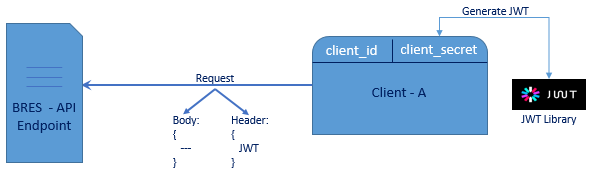
The generated JWT token should be sent along with each API request within the header as Bearer type authorization, example:
Authorization: Bearer eyJhbGciOiJIUzI1NiIsInR5cCI6IkpXVCJ9.eyJzdWIiOiIxMjM0NTY3ODkwIiwibmFtZSI6IkpvaG4gRG9lIiwiYWRtaW4iOnRydWV9.TJVA95OrM7E2cBab30RMHrHDcEfxjoYZgeFONFh7HgQ
Managing API Secret (Key)
This will be completed by the broker within rlpNetwork. The Secret (key) will then be entered into the back office system. Therefore, the back office system must provide an interface for the broker to enter and store this within their back office instance.
Appendix A - Security Example
Below is a C# code to generate JWT using System.IdentityModel.Tokens.Jwt library: https://www.nuget.org/packages/System.IdentityModel.Tokens.Jwt/
A complete C# project containing the code to generate a valid token can be downloaded here.
static void Main(string[] args)
{
string secret = "BRESb7cf3c0e75c34016ab8c8784cbda453a"; // secret of account - created within rlpNetwork
string emailAddress = "xxxxx@royallepage.ca"; // email address of person making the request
string issuer = "###"; // Company ID of brokerage making request
int expireMinutes = 20; // Time in minutes of token expiration
string token = GenerateToken(secret,
emailAddress,
issuer,
expireMinutes);
Console.WriteLine(token);
}
public static string GenerateToken(string secret, string emailAddress, string issuer, int expireMinutes)
{
int expiresInSconds = expireMinutes * 60;
string audience = "Brookfield Real Estate Services";
var symmetricKey = Encoding.ASCII.GetBytes(secret);
DateTime utcNow = DateTime.UtcNow;
int iat = (Int32)(utcNow.Subtract(new DateTime(1970, 1, 1))).TotalSeconds;
var tokenDescriptor = new SecurityTokenDescriptor();
var allClaims = (new[] {
new Claim("iss", issuer),
new Claim("iat", Convert.ToString(iat), ClaimValueTypes.Integer32),
new Claim("exp", Convert.ToString(iat + expiresInSconds), ClaimValueTypes.Integer32),
new Claim("aud", audience),
new Claim("sub", emailAddress),
}).ToList<Claim>();
allClaims.Add(new Claim(ClaimTypes.Name, emailAddress));
tokenDescriptor.Subject = new ClaimsIdentity(allClaims);
tokenDescriptor.Expires = utcNow.AddSeconds(expiresInSconds);
tokenDescriptor.SigningCredentials =
new SigningCredentials
(
new SymmetricSecurityKey(symmetricKey),
SecurityAlgorithms.HmacSha256Signature
);
var tokenHandler = new JwtSecurityTokenHandler();
var securityToken = tokenHandler.CreateToken(tokenDescriptor);
var token = tokenHandler.WriteToken(securityToken);
return (token);
}